Boost

Grow your reach on daily.dev with our Boost tools. Promote your posts to get more views and engagement, or boost your Squad to attract new members. Whether you're sharing content or building a community, Boost helps you connect with the right developers using cores.
Key features
Automated targeting: Our recommendation engine promotes your content to the right developers based on tags, reading habits, and engagement signals. No setup needed.
Flexible budget control: Set your daily budget in cores and choose how long your boost runs. You're always in control.
Native placements: Boosted content shows up in the feed, Squad directory, and discovery areas clearly labeled but fully integrated.
Real-time insights: Track spend, impressions, clicks, engagement, and growth metrics in the ads dashboard.
Two boost types: Promote individual posts for engagement or boost entire Squads to attract new members.
Boost types
Post Boost
Promote individual posts to increase views, engagement, and reach.
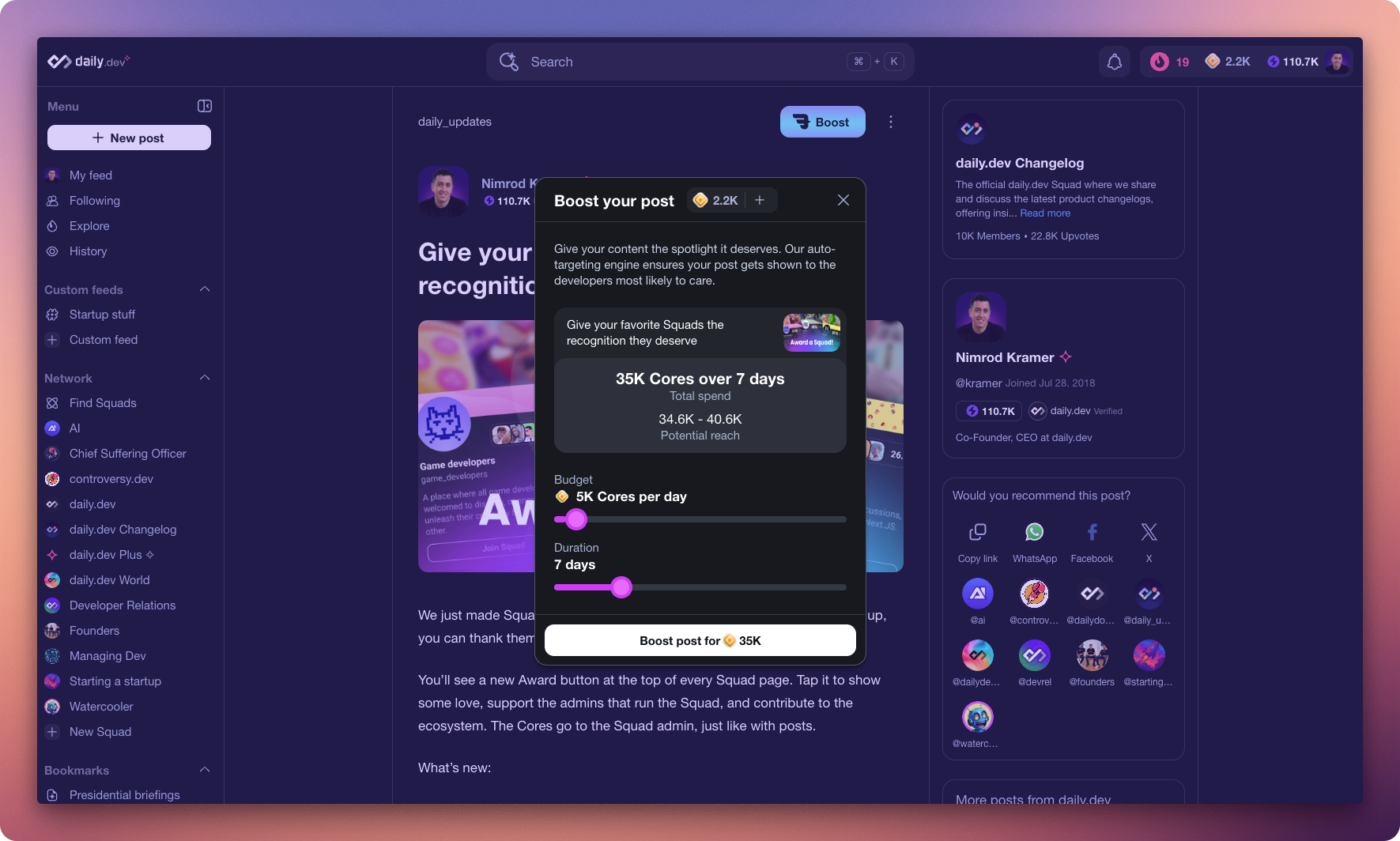
How to boost a post:
- Publish your post (on your profile or in a Squad).
- Click Boost.
- Set your daily budget (in Cores).
- Choose the number of days to run the promotion.
- Confirm the boost and let it run.
Squad Boost
Promote your entire Squad to attract new members and grow your community.
How to boost a Squad:
- Go to your Squad page (you must be an admin or moderator).
- Click Boost.
- Set your daily budget (in Cores).
- Choose the number of days to run the promotion.
- Confirm the boost and let it run.
Requirements for Squad Boost:
- Squad must be public
- Squad must have a description, profile image, and cover image
- Only admins and moderators can boost
- Only one boost can run at a time per Squad
Budget and duration
- Daily budget:
- Minimum: 5,000 cores
- Maximum: 100,000 cores
- Duration: 1–30 days
- Total spend:
daily budget × number of days
You can stop a boost anytime. Unused cores are automatically credited back to your wallet.
Where boosted content appears
Post Boost placements
Boosted posts are featured across daily.dev in:
- The home feed
- Squad feeds
- Relevant tag feeds
- Other discovery surfaces personalized per user
Squad Boost placements
Boosted Squads appear as dedicated cards with Squad details in:
- Main feed: Prime ad slots with "Join Squad" call-to-action
- Squad directory: Featured section with priority placement
- Squad cards show: name, description, member count, cover image, and join button
All placements are labeled as boosted and respect the user experience.
Performance tracking
Track your boost campaigns using the ads dashboard. Access it by clicking on your profile image and choosing "Ads dashboard" from the dropdown menu.
Post Boost metrics
- Spend – total cores used
- Impressions – how many times your post appeared
- Clicks – how many users tapped through
- Engagement – upvotes, comments, bookmarks
Squad Boost metrics
- Spend – total cores used
- Impressions – how many times your Squad card appeared
- Unique reach – number of unique users who saw your Squad
- New members – users who joined your Squad during the campaign
Both boost types show real-time data and campaign progress in the ads dashboard.
Try running shorter, high-budget boosts to spike discovery during key moments, like a product launch or new article drop.
Supporting Squad growth
You don't need to be an admin or moderator to help Squads grow. Awards are a great way to support your favorite communities:
- Give Awards on Squad posts or directly to the Squad itself
- Awards transfer cores directly to Squad admins and moderators
- They can use those cores to boost the Squad and attract more members
- It's a community-driven way to help Squads you love reach more developers
Managing active boosts
Squad Boost management
- Campaign status: When a Squad is being boosted, the boost button shows "Boosting" in a disabled state
- Stop anytime: Only the person who started the boost can stop it via "Manage ad" in the three-dot menu
- One at a time: Only one admin/mod can boost a Squad at any given time
- Refunds: Unused cores are automatically refunded when you stop a campaign early
Notifications
You'll receive notifications when:
- Your boost campaign completes (both email and in-app)
- Campaign progress updates during longer boosts
FAQs
Can I boost Squad posts?
Yes. Post Boost works for any published post, including those in Squads.
Can I boost private Squads?
No. Only public Squads can be boosted.
Do I need to configure targeting?
No. Targeting is handled automatically based on Squad categories and content tags.
Can I run multiple boosts at once?
Yes for Post Boosts. For Squad Boosts, only one can run per Squad at a time.
What if my Squad doesn't have required details?
You'll be prompted to add a description, profile image, and cover image in Squad settings before boosting.
Where can I see results?
Check the ads dashboard for real-time metrics on each boost campaign.
Need help?
Reach out anytime at support@daily.dev